![WFI_Logo_Color_Small-1.png]](https://we.workforimpact.com/hs-fs/hubfs/WFI_Logo_Color_Small-1.png?height=40&name=WFI_Logo_Color_Small-1.png)
Using Different Payout Methods for Different Contracts
If you are working on more than one contract, you can assign a different payout method to each contract.
For example:
-
Job A → Direct Bank Transfer
-
Job B → Payoneer
You can also change the payout method for the same contract at any time. For example, you may choose Direct Bank Transfer one week and Payoneer the next.
Please note:
-
Any payouts (for hourly contracts) or funded milestones (for fixed-price contracts) that were already processed or funded will remain linked to the payout method selected at that time.
-
The newly selected payout method will only apply to future transactions.
How to Set Up Direct Bank Transfer
Follow the steps below to connect your bank account:
1. Access your Billing settings
-
Log in to your account and go to Billing → Account Details
Before setting up your bank account, you will be asked to verify your identity and provide proof of address.
This step is required for compliance with financial regulations, including anti-money laundering (AML) and know-your-customer (KYC) requirements. These measures help ensure secure transactions and protect both contractors and clients.
You will be redirected to:
Personal Settings → General → Verify Your Identity
Follow the instructions on the screen to complete the verification process.
3. Connect Direct Bank Transfer
Once your identity is verified:
-
Go back to Billing → Account Details
-
Select Direct Bank Transfer
-
Click Connect
4. Enter Your Bank Details
You will be asked to provide the following information:
Country
Select your country from the drop-down menu.
The currency will be automatically filled in.
Recipient Type
Choose one of the following:
-
Individual – Select this if the bank account is in your personal name.
-
Business – Select this if the bank account belongs to a registered company.
Make sure you choose the option that matches the legal owner of the bank account.
Transfer Method: SEPA, Local or SWIFT
You will need to select one of the following transfer methods. Once you select your country from the drop-down menu while setting up your bank account, you’ll see all the relevant details for the available options, including fees, processing times, and any country-specific requirements:
-
SEPA – Used for EUR transfers within the SEPA zone (European Union and other participating countries). SEPA transfers are typically faster and usually do not involve additional fees.
- Local - Works like a standard local bank transfer in your country. Local transfers usually do not involve additional fees and are processed according to your bank’s local transfer times.
-
SWIFT (US only) – A type of international bank transfer available for US bank accounts. It can be used to send money across countries or in non-EUR currencies. SWIFT transfers are processed through a network of banks and may take longer than SEPA or Local transfers. Fees and processing times may vary depending on your bank.
Choose the option that corresponds to your bank account and location.
Bank Account Details
Enter your bank account details exactly as they appear on your bank statement.
Name of Account Holder
This must match:
-
The name on your bank account
-
The name submitted during identity verification
The bank account must belong to you (the contractor).
Address
Enter your full address.
Start typing your address and select it from the drop-down list once it appears. The City and Postcode fields will be automatically filled in.
The address must match the proof of address submitted during identity verification.
5. Submit
Click Submit to save your bank details.
6. Set as Default
To make Direct Bank Transfer your default payout method, turn the toggle switch to the right.
When enabled, this method will automatically be selected for new contracts unless changed manually.
How to Assign Direct Bank Transfer to a Contract
After setting up your bank account, you can link it to a contract directly from your Billing → Account Details page.
Under Direct Bank Transfer, click the drop-down menu and select the contract you’d like to assign: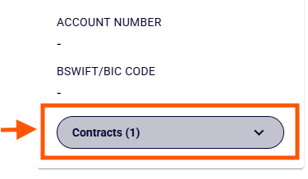
Your selected method will apply to future payments for that contract.
Still have questions? Check our FAQ!